SPF (Sender Policy Framework) is a DNS record (zone entry) that lists which mail servers are authorised to send email from your domain name. Adding an SPF record helps prevent spammers from spoofing your address and reduces the bounce messages you receive for emails you did not actually send.
Why you need an SPF record
Email works much like ordinary post: it is possible to forge the sender of a message just as you can write any return address on a letter. This means anyone can send an email that appears to come from your address.
A common symptom is that you start receiving bounce messages for emails that could not be delivered, even though you never sent them. Spam robots that have picked up your email address are using it to send advertising and other unwanted traffic.
SPF controls which mail servers are allowed to send email on behalf of a particular domain name. It is published as a TXT record in the domain’s DNS configuration, and receiving mail servers check it before accepting messages.
Loopia’s recommended SPF record
If you only want Loopia’s mail servers to send email from your domain name, use the following SPF record:
@ IN TXT "v=spf1 include:kundspf.loopia.se -all"
Note that if you use an email client to send mail, you will then need to use Loopia’s outgoing (SMTP) server rather than your internet provider’s.
Add the SPF record in the DNS editor
To add the record, follow these steps:
- Log in to the Loopia customer zone.
- Click on “Domain and web” → “Domain properties”, select your domain name, and click “DNS editor”.
- Click on the subdomain (e.g. blog.example.com) named “@” to open the form for adding a new record.
- Fill in the form as follows:
Type: TXT
TTL: Usually 300 or 3600 (same as the other records under @)
Priority: Ignore this
Data: "v=spf1  include:kundspf.loopia.se -all" (with the quote characters around)
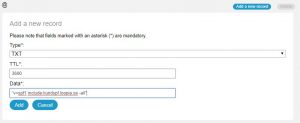
Click “Add”. It can take up to 24 hours before the DNS change has propagated and the record takes effect.
More information about SPF
If you want to build a custom SPF record or read more about how SPF works, the following resources may help: