Transmit is an FTP client (file upload program) developed for Mac by Panic that you can use to upload files to your Loopia web hosting via FTP (File Transfer Protocol), FTPS (FTP over SSL/TLS) and SFTP (Secure FTP / SSH FTP). It supports most FTP servers and has an easy-to-understand interface. You can download Transmit from the Panic website.
Connect to your Loopia FTP account in Transmit
Install and start Transmit according to the instructions supplied with the program.
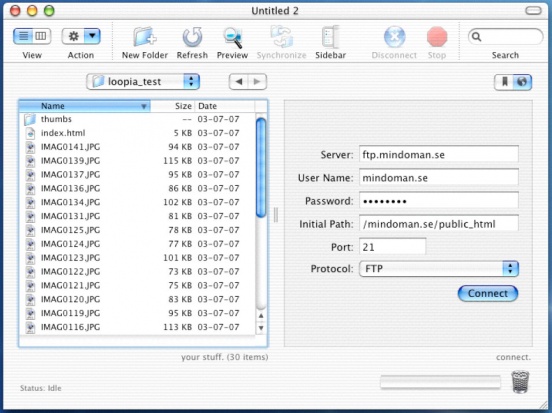
In the connection panel, enter the following details:
- Server: ftpcluster.loopia.se
- User Name: example.com (replace example.com with your FTP username, normally your domain name)
- Password: your FTP password
- Initial Path: /example.com/public_html (replace example.com with the domain name you have with us)
- Port: 21 (standard port)
- Protocol: FTP — choose FTP with TLS/SSL or SFTP for an encrypted connection
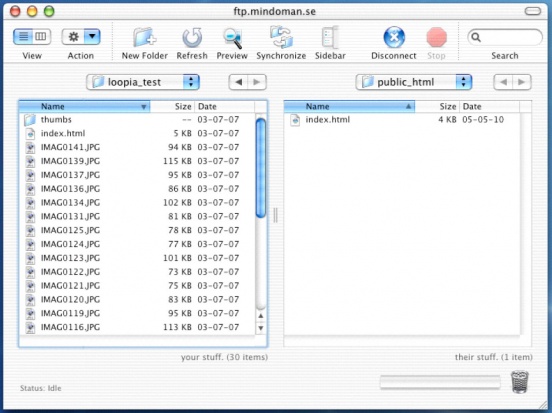
Click Connect to log in to the FTP server.
Upload files to your website
The left-hand pane shows the files on your computer and the right-hand pane shows the files on your FTP account. To upload files, drag them from the left-hand pane to the right-hand pane. You can also click Synchronize to keep the files on your computer in sync with the files on your FTP account.