The Loopia Boost platform does not support rewrites via a .htaccess file. Instead, you add rewrites from the Boost Settings panel in Loopia Customer Zone.
You do not need to add the standard rewrites for WordPress, Joomla or Drupal. They are already configured on the server when you select the matching CMS in the Boost settings. The guide below is only for adding custom rewrites to a site.
How to add a custom rewrite
In the Boost settings, scroll down to Directory settings & Redirects. Here you can choose the base folder – usually root, which is equivalent to RewriteBase / in .htaccess.
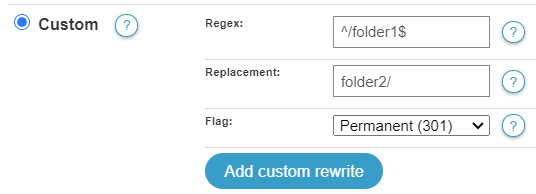
Click on root to add a rewrite. In this example we will add a rewrite that redirects from folder1 to folder2.
- In Regex, enter: ^/folder1$
- In Replacement, enter: folder2/
- For Flag, select: Permanent (301)
- Click Add custom rewrite.
- If this is your only rewrite, click Save.
The custom rewrite is now active. Reload your website to test it.