Changing your WordPress password is a quick process you can do from your user profile in the WordPress dashboard (admin area, wp-admin), and using a strong password is one of the most important things you can do to keep your site secure. It’s a good habit to change the password regularly, and essential if you suspect anyone else has had access to your account.
Change your WordPress password
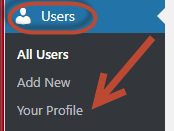
- Log in to your WordPress dashboard and click Users in the left-hand menu, then Your Profile.
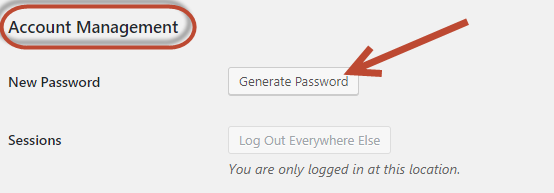
- Scroll down to the Account Management section and click Set New Password (older versions of WordPress label this Generate Password).
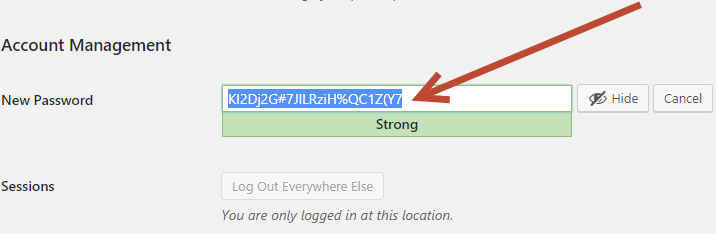
- WordPress will suggest a strong random password. You can use the suggested one, or type your own into the New Password field. WordPress will show a strength indicator as you type.
- Scroll to the bottom of the page and click Update Profile to save the change.
What makes a strong password?
A strong password is long, mixed and unpredictable. Aim for the following:
- At least 12 characters (more is better – the longer the password, the harder it is to crack).
- A mix of upper- and lower-case letters.
- At least one number.
- At least one special character (such as ! ? % & #).
- Not based on a single dictionary word, a name, or a date.
- Unique to this site – don’t reuse a password you use anywhere else.
If you have trouble remembering complex passwords, use a password manager (such as Bitwarden, 1Password or KeePass) to generate and store them for you.
Examples of strong passwords
- cucWiUk5!tR9pQ
- etCib!twiwraj5
- NyanuksAgyucVoc5
Examples of weak passwords
- summer
- 123456
- sock