You can export your MySQL (database) from Loopia in two ways: by downloading one of the daily automatic backups we make, or by creating a manual backup yourself in phpMyAdmin (database admin tool). This guide shows you both methods from the Loopia Customer Zone.
Download an automatic database backup
Log in to the Loopia Customer Zone. Scroll down and click your database under the heading Databases.

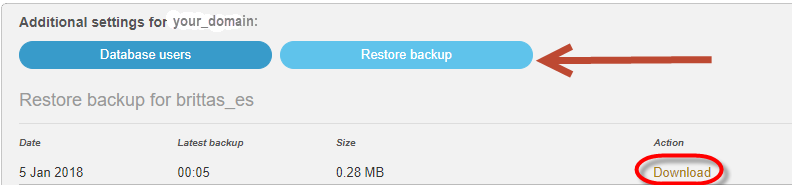
In the panel that appears, click Restore backup to see a list of all the automatic backups we have made for your database, with timestamps for each one. Click Download next to the backup you want to save to your computer.
Create a manual backup with phpMyAdmin
To create a manual backup of your database, use the phpMyAdmin utility available in the Customer Zone. Start by logging in to phpMyAdmin.
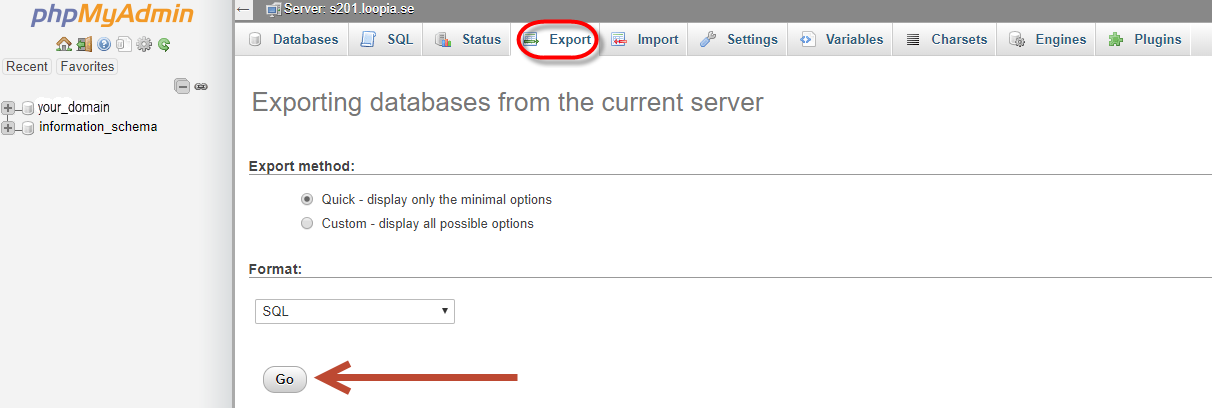
To back up the database, click the Export tab at the top of the page (the default settings are usually fine), then click Go. You will then be prompted to choose where your computer should save the backup file.