Apache 2.4 (HTTP server) is the web server version used on Loopia’s Unix web hosting platform. This guide describes the most common changes you need to make to ensure your website is compatible with Apache 2.4, how to switch to it in Loopia Customer Zone, and the advanced .htaccess directive changes that come with the upgrade.
Why upgrade to Apache 2.4
Apache 2.4 has many advantages over its predecessor, Apache 2.2. The biggest benefit is performance: Apache 2.4 is significantly more efficient than 2.2 and can therefore deliver most websites faster.
As support for Apache 2.2 will end completely in the near future, this update should be carried out as soon as possible.
Make your website compatible with Apache 2.4
If you are using WordPress, Joomla or another publishing tool, there is probably not much you will need to do to get your site to work with Apache 2.4.
- Always make sure that everything (WordPress, Joomla, plugins, themes, etc.) is updated to the latest version.
- Make sure the plugins/themes you are using still receive updates from the developers. For WordPress, you will find this information on wordpress.org or on the website where the theme/plugin was purchased. If the plugin/theme has been updated within the past few months it can be considered active and should be compatible with Apache 2.4.
- If parts of your website are custom-built, please contact whoever built the website and verify that all of these sections are compatible with Apache 2.4.
Note that any updates must be completed before you switch to Apache 2.4 in Loopia Customer Zone. Should the page stop functioning after you change to Apache 2.4, try switching to PHP version 7.0, 7.1 or 7.2, or contact our support.
Get your website running on Apache 2.4
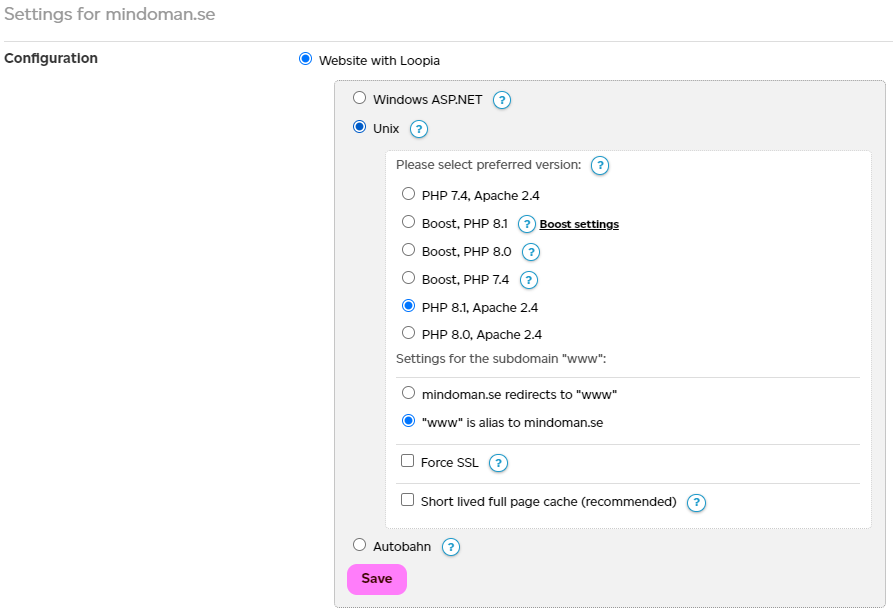
To run your website on Apache 2.4 at Loopia, log in to Loopia Customer Zone and click on your domain name. Under the heading “Configuration“, select “Website with Loopia” > “Unix” and choose “PHP 7.2 Apache 2.4” to run the site with Apache 2.4 and PHP 7.2.
Manual update (advanced)
The update to Apache 2.4 affects directives in the .htaccess file, including features that write to .htaccess. The major changes here concern the authorisation settings, which control who can see a page and who is blocked. These features are often used in page firewalls, for example to only allow visitors with specific IP addresses to access a page. Check if your .htaccess file contains any of the following directives:
- Order
- Allow
- Deny
- Satisfy
If it does not, you likely do not use such features today and the code should already work properly on Apache 2.4.
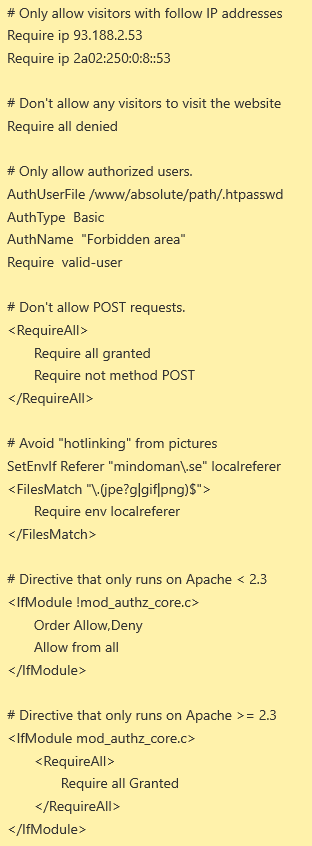
In Apache 2.4, the Require directive is used instead to describe the criteria that must be met for a visitor to see the page.
See also: https://httpd.apache.org/docs/2.4/mod/mod_authz_core.html
These directives can be grouped into different blocks that govern what is required for them to be considered fulfilled.
RequireAll
All requirements must be met for the visitor to access the page.
RequireAny
Only one requirement in the block must be met for the visitor to access the page. If the Require directives are not grouped, they are handled in the same way as if they were a RequireAny block.
RequireNone
None of the Require directives in the block may be met for the visitor to access the page.
Example
Changes affecting AddOutputFilterByType
The AddOutputFilterByType directive has been moved to the mod_filter module in Apache 2.4. This module is not available on our web servers, so all lines in .htaccess that use this directive must be removed.
If you currently use this directive to enable gzip (HTTP compression), you do not need to do anything other than delete those lines. Gzip compression is automatically enabled on our Apache 2.4 platform.
Other changes and more information
In addition to the changes above, some minor changes have also been made in Apache 2.4. The majority of those who need to update their code are not affected by these. A complete description of what has been updated can be found below: